Sending AO3 updates directly to your Kobo #
This is how I get my AO3 fic subscription alerts converted into stories on my Kobo automatically. It takes some set-up and requires you have a Gmail and Dropbox. The free tier for all of this works fine for me at about 20-30 updates daily.
What this does:
- Looks for any complete story alerts in your gmail folder
- Opens the AO3 link to grab the epub file
- Moves the epub file into the dropbox folder for your Kobo
- If it didn’t work (story isn’t complete, error), stars the email and doesn’t move it to the finished folder
Setting up your Gmail #
Your AO3 subscriptions need to go to a folder. In Gmail, this is called a label, and you set it up via Settings:Labels. You’ll need at least two labels, one to hold all the fresh incoming subscription emails from AO3 and one to move them over once they’ve been uploaded to Kobo. I keep them so I can follow up with comments later on.
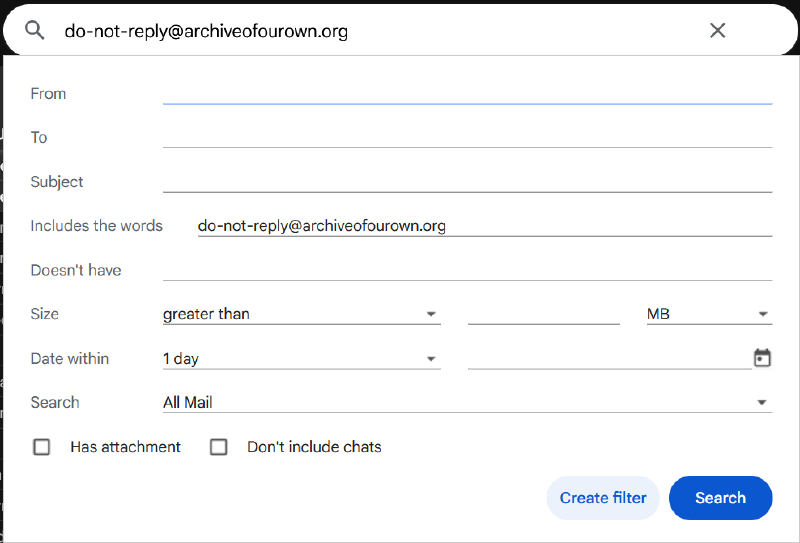
Search for all emails coming from “do-not-reply@archiveofourown.org” and with “posted” in the subject line. Create a filter to move them to a folder. Mine is called “label:60-69-media-62.02-ao3”. Note that if you are nesting your folders, the label name will use - instead of / or \ for subfolders.
My finished folder is called “label:60-69-media-62.02-ao3-kobo”.
I’ve also got folders set up for Comments and Kudos (same search but adding in the subject line matches) but if you don’t get these often, you can go ahead with just two folders.
Setting up your Dropbox #
Kobo has a built-in Dropbox sync. Follow the official instructions to set yours up. You can do this with Google too, but my Google space is used for other projects and so I’m using Dropbox. It should be pretty easy to switch this part over to Google Drive on your own.
Once set up, your Dropbox account will have a folder inside the local Dropbox folder on your computer called Apps>Rakuten Kobo. You can’t change the name of this folder or move it anywhere else.
Set up the script in script.google.com #
Sign in with your google account. Set up a new project and call it “AO3toKobo” or whatever. You’re going to need to create two files and add the OAuth library (so you can login to your dropbox account) and set up some script properties and schedule this to run regularly.
Project Settings. #
First go to Project Settings, the little cog on the lefthand menu. Set your timezone and also make sure all three boxes are checked.
You’ll need to set up Google Cloud Platform for a project to make the authorisations all work. You can log in directly at GCP or you can just click through to set up a default project. On an individual level, this script uses almost no resources so nothing needs to be paid or set up beyond a default project ID. Ignore all the rest of the technical stuff on that side past getting the ID.
You do need to make sure you’ve got your name and email address (does not have to be your legal name, but must be a working email address) on the project as the owner.
Now on Script Properties, you’ll need to set up three specific properties for your accounts:
- AO3_SESSION_COOKIE
- DROPBOX_CLIENT_ID
- DROPBOX_CLIENT_SECRET
Create the three pairs and give them the value dummy for now.
How to get your AO3 Session Cookie #
Open an AO3 page where you are logged in. Right-click to inspect the page and you’ll see a console split your browser to show you all the code of the page.
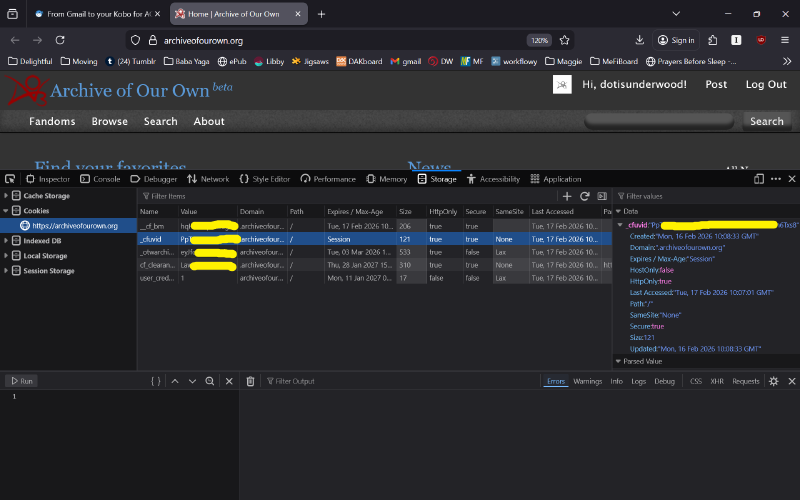
Click on the Storage tab and then cookies in the lefthand list. You’ll see several values listed and the one you want to carefully copy is _cfuvid. Click on the righthand Data box and you’ll be able to copy the whole string.
Go back to Google Scripts and save that string to AO3_SESSION_COOKIE as the value.
This should last a pretty long while - AO3 allows for multiple session cookies.
How to get your Dropbox codes #
Now you need to set up a Dropbox developer app on Dropbox Developers. This will stay in Development so it’s just used by you and thus free.
Create an app and choose:
- Scoped access
- Full Dropbox (so you can access the Rabukuten Kobo folder to upload)
- Name your app - I called mine Ao3Kobo
Then you’ll have a development app which only you can access with an App key and App secret. Copy these over to the Google Scripts.
You’ll need to do some more setup for Dropbox a few steps further on.
Setting up OAuth #
Okay so Dropbox will not keep your access running for long due to security concerns. So! You need to set up proper logging in. This is surprisingly easy with the OAuth2 library - Github for the official app. Click that link to copy the current script ID.
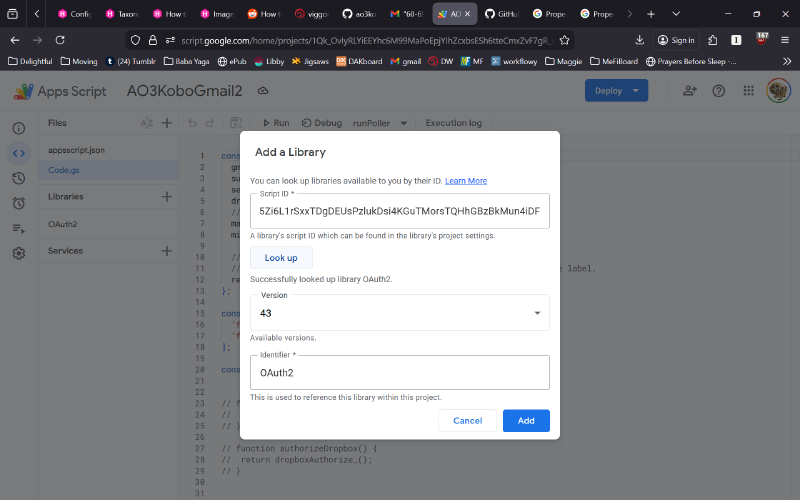
Then back in Google Scripts, go to the editor < > and click + Libraries and look up that script ID. Once you see it, add it to your project. I’m using version 43 currently.
Go to your project settings page now and copy the script ID.
Back to Dropbox to add OAuth. #
Go back to your Dropbox app’s Settings tab. OAuth 2 should show Redirect URI as a blank field. You’ll need to update this with:
https://script.google.com/macros/d/REPLACE WITH SCRIPT ID/usercallback
Where REPLACE WITH SCRIPT ID is actually the script ID from the Project Settings page you just copied.
Make sure “Allow public clients (Implicit Grant & PKCE)” is checked, and then go to the Permissions tab.
These are the editable fields that should be checked:
- files.metadata.write
- files.content.write
- files.content.read
Then go back to Settings and now you can click Generate for Generate access token.
You’ll finish setting up the OAuth stuff later, but this is fine now.
Add the script file Code.gs #
Okay, here is the code to copy & paste. We’ll go through the parts you need to uncomment, run, then comment next.
code.gs
const CONFIG = {
  // change to your incoming AO3 emails gmail label
  gmailLabel: '60-69 Media/62.02 ao3',
  // change to your done AO3 emails gmail label
  successLabel: '60-69 Media/62.02 ao3/kobo',
  senderEmail: 'do-not-reply@archiveofourown.org',
  dropboxFolderPath: '/Apps/Rakuten Kobo',
  //dropboxFolderPath: '/Ao3Kobo',
  maxPerRun: 7,
  minDelayMsBetweenDownloads: 1200,

  // Recommended: treat gmailLabel as a true “queue”
  // If true: once processed, message/thread is removed from the queue label.
  removeQueueLabelOnSuccess: false
};

const DROPBOX_SCOPES = [
  'files.content.write',
  'files.metadata.read'
];

const DEBUG = true; // ← turn logs on/off here

// function setupDropboxAuth() {
//   return dropboxGetRedirectUri_();
// }

// function authorizeDropbox() {
//  return dropboxAuthorize_();
// }


function runPoller() {
  debugLog_('▶ runPoller start');

  Logger.log('typeof OAuth2 = ' + typeof OAuth2);

  const queueLabel = GmailApp.getUserLabelByName(CONFIG.gmailLabel);
  if (!queueLabel) {
	Logger.log(`✖ Gmail label not found: ${CONFIG.gmailLabel}`);
	throw new Error(`Missing Gmail label: ${CONFIG.gmailLabel}`);
  }
  Logger.log(`✔ Found label: ${CONFIG.gmailLabel}`);

  let successLabel = GmailApp.getUserLabelByName(CONFIG.successLabel);
  if (!successLabel) {
  successLabel = GmailApp.createLabel(CONFIG.successLabel);
  Logger.log(`✔ Created label: ${CONFIG.successLabel}`);
  } else {
  Logger.log(`✔ Found success label: ${CONFIG.successLabel}`);
  }


  const threads = queueLabel.getThreads(0, 50);
  Logger.log(`• Found ${threads.length} threads under label`);

  let processed = 0;

  for (const thread of threads) {
	Logger.log(`→ Thread ${thread.getId()}`);
	const messages = thread.getMessages();
	Logger.log(`  → ${messages.length} message(s) in thread`);

	for (const msg of messages) {
	  if (processed >= CONFIG.maxPerRun) {
		Logger.log('⏹ Reached maxPerRun, stopping');
		return;
	  }

	  const msgId = msg.getId();
	  Logger.log(`→ Checking message ${msgId}`);

	  // Only process unread messages: read == done
	  if (!msg.isUnread()) {
		Logger.log('  ⏭ Message already read (treated as processed), skipping');
		continue;
	  }

	  // Only process AO3 sender
	  const from = msg.getFrom() || '';
	  if (!from.includes(CONFIG.senderEmail)) {
		Logger.log(`  ⏭ Sender does not match AO3 (${from}), skipping`);
		continue;
	  }
	  Logger.log('  ✓ Sender matches AO3');

	  try {
		const text = msg.getPlainBody() || '';

		// ✅ Chapters gate BEFORE downloading
		const ch = isAo3EmailComplete_(text);

		if (ch.status !== 'complete') {
		  Logger.log(`  ⏭ Skipping: chapters not complete (${ch.status}${ch.current ? ` ${ch.current}/${ch.total ?? '?'}` : ''})`);

		  // SKIP state (what you asked for):
		  // - star it (visible)
		  // - mark read (so it doesn't retry forever)
		  msg.star();
		  msg.markRead();

		  // Optional: also remove from the queue label so it stops clogging the label view
		  // (This does NOT delete the email.)
		  // queueLabel.removeFromThread(thread);
		  continue;
		}

		const workId = extractAo3WorkId_(text);
		if (!workId) {
		  throw new Error('AO3 work ID not found in email body');
		}
		Logger.log(`  ✓ Extracted workId: ${workId}`);

		Logger.log('  → Fetching EPUB from AO3');
		const { blob, filename } = downloadEpubAndName_(workId);
		Logger.log(`  ✓ EPUB downloaded: ${filename} (${blob.getBytes().length} bytes)`);

		const dropboxPath = `${CONFIG.dropboxFolderPath}/${sanitizeDropboxFilename_(filename)}`;
		Logger.log(`  → Uploading to Dropbox: ${dropboxPath}`);
		uploadToDropbox_(dropboxPath, blob);
		Logger.log('  ✓ Dropbox upload successful');

		// SUCCESS state:
		// - mark read (so we never do it again)
		// - unstar (clear any prior error)
		msg.markRead();
		msg.unstar();

		// Move thread from queue label → kobo label
		try {
		  queueLabel.removeFromThread(thread);
		  Logger.log(`  ✓ Removed queue label: ${CONFIG.gmailLabel}`);
		} catch (e) {
		  Logger.log(`  ⚠ Could not remove queue label: ${e}`);
		}

		try {
		  successLabel.addToThread(thread);
		  Logger.log(`  ✓ Added success label: ${CONFIG.successLabel}`);
		} catch (e) {
		  Logger.log(`  ⚠ Could not add success label: ${e}`);
		}


		processed += 1;
		Logger.log(`  ✓ Message ${msgId} processed successfully`);

		Utilities.sleep(CONFIG.minDelayMsBetweenDownloads);

	  } catch (err) {
		Logger.log(`✖ ERROR processing message ${msgId}: ${err && err.message ? err.message : err}`);

		// ERROR state:
		// - star it (visible)
		// - leave unread so it retries next run
		try { msg.star(); } catch (e) {}
		Logger.log('  → Message starred and left unread for retry');
	  }
	}
  }

  Logger.log('▶ runPoller finished');
}

function debugLog_(msg) {
  if (DEBUG) Logger.log(msg);
}

/** --- AO3 download --- */

function downloadEpubAndName_(workId) {
  const cookieVal = PropertiesService.getScriptProperties().getProperty('AO3_SESSION_COOKIE');
  if (!cookieVal) throw new Error('AO3_SESSION_COOKIE missing');

  const url = `https://archiveofourown.org/downloads/${workId}/a.epub`;
  Logger.log(`    → AO3 URL: ${url}`);

  // Follow redirects normally (AO3 often redirects to download.archiveofourown.org)

const resp = UrlFetchApp.fetch(url, {
  followRedirects: true,
  muteHttpExceptions: true,
  headers: {
	'User-Agent':
	  'Mozilla/5.0 (Windows NT 10.0; Win64; x64) ' +
	  'AppleWebKit/537.36 (KHTML, like Gecko) ' +
	  'Chrome/120.0.0.0 Safari/537.36',
	...(cookieVal ? { 'Cookie': `_otwarchive_session=${cookieVal};` } : {})
  }
});

  const code = resp.getResponseCode();
  Logger.log(`    ← AO3 final response code: ${code}`);

  // If auth fails, the "final" response often becomes an HTML page (not an epub)
  const ct = (resp.getHeaders()['Content-Type'] || resp.getHeaders()['content-type'] || '').toLowerCase();
  Logger.log(`    ← AO3 content-type: ${ct}`);

  if (code === 401 || code === 403) {
	throw new Error(`AO3 denied access (${code})`);
  }
  if (code < 200 || code >= 400) {
	const snippet = safeSnippet_(resp.getContentText(), 300);
	throw new Error(`AO3 download failed (${code}). Snippet: ${snippet}`);
  }

  // Extra hardening: ensure we actually got an epub-ish response
  // (Some failures return HTML with 200)

  if (ct.includes('text/html')) {
	const html = resp.getContentText() || '';

	// Log a bit from later in the page too (reason text is often in the body)
	Logger.log(`    ← AO3 HTML diagnosis: ${diagnoseAo3Html_(html)}`);
	Logger.log(`    ← AO3 HTML head snippet: ${safeSnippet_(html, 300)}`);

	// Try to find a more meaningful snippet from the body
	const bodyish = html.replace(/[\s\S]*?<body[^>]*>/i, '').slice(0, 1200);
	Logger.log(`    ← AO3 HTML body snippet: ${safeSnippet_(bodyish, 400)}`);

	throw new Error('AO3 returned HTML instead of EPUB (see diagnosis above).');
  }


  const blob = resp.getBlob();

  // Filename from Content-Disposition if present
  const cd = resp.getHeaders()['Content-Disposition'] || resp.getHeaders()['content-disposition'] || '';
  const filename = extractFilenameFromContentDisposition_(cd) || `ao3_${workId}.epub`;

  return { blob, filename };
}


/** --- Dropbox upload --- */

function uploadToDropbox_(path, blob) {

  // Tripwire to force library resolution
  const __oauth2_loaded = typeof OAuth2;

  const service = getDropboxService_();
  if (!service.hasAccess()) {
	throw new Error('Dropbox not authorized. Run dropboxAuthorize_() and complete the auth flow.');
  }

  const token = service.getAccessToken();

  const apiArg = {
	path,
	mode: 'add',
	autorename: true,
	mute: false
  };
  Logger.log(`    → Dropbox API arg: ${JSON.stringify(apiArg)}`);

  const resp = UrlFetchApp.fetch('https://content.dropboxapi.com/2/files/upload', {
	method: 'post',
	contentType: 'application/octet-stream',
	payload: blob.getBytes(),
	headers: {
	  Authorization: `Bearer ${token}`,
	  'Dropbox-API-Arg': JSON.stringify(apiArg)
	},
	muteHttpExceptions: true
  });

  const code = resp.getResponseCode();
  const body = resp.getContentText() || '';
  Logger.log(`    ← Dropbox response code: ${code}`);
  Logger.log(`    ← Dropbox response body: ${safeSnippet_(body, 2000)}`);

  if (code < 200 || code >= 400) {
	throw new Error(`Dropbox upload failed (${code}). Body: ${safeSnippet_(body, 800)}`);
  }
}

/** --- Helpers (unchanged) --- */

function extractAo3WorkId_(text) {
  const m = (text || '').match(/https?:\/\/(?:www\.)?archiveofourown\.org\/works\/(\d+)/i);
  return m ? m[1] : null;
}

function sanitizeDropboxFilename_(name) {
  return (name || 'ao3.epub')
	.replace(/[\/\\]/g, '_')
	.replace(/[\u0000-\u001F\u007F]/g, '')
	.trim()
	.slice(0, 180);
}

function extractFilenameFromContentDisposition_(cd) {
  if (!cd) return null;
  let m = cd.match(/filename\*\s*=\s*UTF-8''([^;]+)/i);
  if (m) return decodeURIComponent(m[1]);
  m = cd.match(/filename\s*=\s*"?([^";]+)"?/i);
  return m ? m[1] : null;
}

function safeSnippet_(s, maxLen) {
  if (!s) return '';
  const clean = String(s).replace(/\s+/g, ' ').trim();
  return clean.length > maxLen ? clean.slice(0, maxLen) + '…' : clean;
}

function diagnoseAo3Html_(html) {
  const lower = (html || '').toLowerCase();

  // Common AO3 cases
  if (lower.includes('login') && (lower.includes('password') || lower.includes('log in'))) {
	return 'Looks like AO3 login page (session not authenticated).';
  }
  if (lower.includes('this work is only available to registered users')) {
	return 'Work restricted to registered users (should work when logged in).';
  }
  if (lower.includes('you do not have permission') || lower.includes('you are not allowed')) {
	return 'Permission/collection restriction (may be inaccessible even when logged in).';
  }
  if (lower.includes('adult content') && lower.includes('proceed')) {
	return 'Adult-content confirmation interstitial (needs preference/consent).';
  }
  if (lower.includes('retry later') || lower.includes('error') && lower.includes('back')) {
	return 'AO3 error page / temporary issue.';
  }
  return 'Unknown HTML page type.';
}

function getDropboxService_() {
  const props = PropertiesService.getScriptProperties();
  const clientId = props.getProperty('DROPBOX_CLIENT_ID');
  const clientSecret = props.getProperty('DROPBOX_CLIENT_SECRET');
  if (!clientId || !clientSecret) {
	throw new Error('Missing DROPBOX_CLIENT_ID or DROPBOX_CLIENT_SECRET in Script Properties.');
  }

  return OAuth2.createService('dropbox')
	.setAuthorizationBaseUrl('https://www.dropbox.com/oauth2/authorize')
	.setTokenUrl('https://api.dropboxapi.com/oauth2/token')
	.setClientId(clientId)
	.setClientSecret(clientSecret)
	.setCallbackFunction('dropboxAuthCallback_')

	// Store tokens here:
	.setPropertyStore(PropertiesService.getUserProperties())

	// Get refresh token
	.setParam('token_access_type', 'offline')

	// Ask for scopes
	.setScope(DROPBOX_SCOPES.join(' '))
}

function dropboxGetRedirectUri_() {
  const service = getDropboxService_();
  Logger.log(service.getRedirectUri());
  return service.getRedirectUri();
}

function dropboxAuthorize_() {
  const service = getDropboxService_();
  const url = service.getAuthorizationUrl();
  Logger.log(url);
  return url;
}

function dropboxAuthCallback_(request) {
  const service = getDropboxService_();
  const ok = service.handleCallback(request);
  return HtmlService.createHtmlOutput(ok ? 'Dropbox auth OK. You can close this.' : 'Dropbox auth denied.');
}

function dropboxResetAuth_() {
  getDropboxService_().reset();
}

function isAo3EmailComplete_(text) {
  const complete = /Chapters:\s*(\d+)\s*\/\s*\1\b/i.test(text || '');
  return complete ? { status: 'complete' } : { status: 'not-complete' };
}
Add or edit appsscript.JSON #
This file is auto-generated usually, but just in case:
{
  // Set to your timezone
  "timeZone": "Asia/Singapore",
  "dependencies": {
	"libraries": [
	  {
		"userSymbol": "OAuth2",
		"version": "43",
		"libraryId": "1B7FSrk5Zi6L1rSxxTDgDEUsPzlukDsi4KGuTMorsTQHhGBzBkMun4iDF"
	  }
	]
  },
  "exceptionLogging": "STACKDRIVER",
  "runtimeVersion": "V8",
  "oauthScopes": [
	"https://www.googleapis.com/auth/gmail.modify",
	"https://www.googleapis.com/auth/script.external_request"
  ]
}
Now to uncomment and run the first time #
You need to run setupDropboxAuth() and authorizeDropbox()functions as part of setup. Ctrl+F to find setupDropboxAuth() in code.gs and then carefully delete the // comments on the lines here:
	function setupDropboxAuth() {
	   return dropboxGetRedirectUri_();
	}

//	function authorizeDropbox() {
//	  return dropboxAuthorize_();
//	}
Save the files and click Run (next to Debug in <> Editor). You’ll see an execution log pop-up and it’ll generate a redirect URI. This should be the same redirect URI you copied into the Dropbox program already, but double-check.
Now go back to run the authoriseDropbox() function. Same section of code, but change the commenting to:
//	function setupDropboxAuth() {
//	   return dropboxGetRedirectUri_();
//	}

	function authorizeDropbox() {
	  return dropboxAuthorize_();
	}
Save the files and click Run again. This will show a new long link in the log. Copy and open this in a new browser window and click through to confirm the authorisation of your dropbox.
Go back to the files and now comment them all out like this:
//	function setupDropboxAuth() {
//	   return dropboxGetRedirectUri_();
//	}

//	function authorizeDropbox() {
//	  return dropboxAuthorize_();
//	}
Don’t delete them in case you need to re-run them for a new dropbox token in a year. Save the files.
Run your script to check #
Check in Gmail that you have at least a couple of recent AO3 update emails in the folder that are for complete stories. This script checks the most recent 50 emails to see if it should download the epub in them.
Run the whole script again and then go to your gmail and see if the matching emails were moved to the finished folder. Check if any non-matching (Part 2/?, part 3/4 etc) update emails were starred and left behind. Go over to your Rabukuten Kobo folder and see if the matching epubs were downloaded there.
Authorising gmail #
I had issues authorising Gmail for my script. I kept getting caught in a security warning. Turned out I was using Firefox instead of Google Chrome. Ran everything again one time in Chrome, and since then it’s been fine in Firefox.
Updates for multiple new stories #
This script also only grabs the very first story in a multi-story update notification. It should fail (star and leave in the incoming folder) for those so you can then manually decide what to download for multiple updates, which are relatively rarer.
Set it up to run regularly #
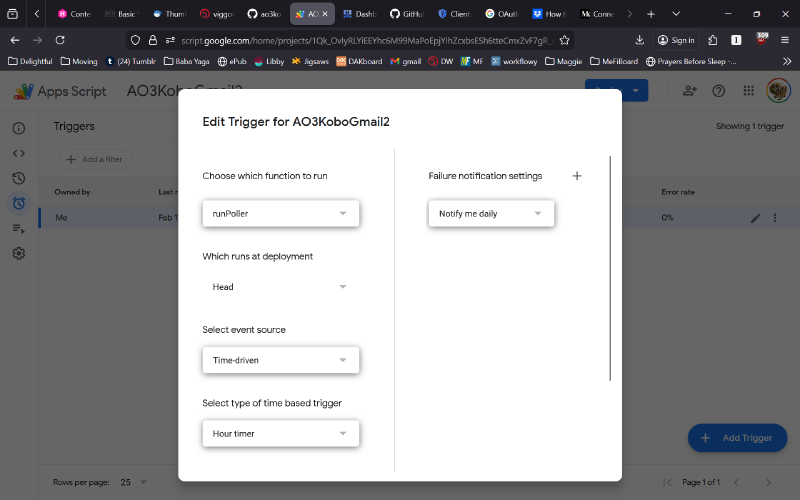
In Google Script, go to Triggers and Add a new trigger. You want it to run runPoller function as time-driven and hourly. You can change it to longer if you seldom get updates, but do not set it shorter!
Why? AO3 servers delightfully allow scripted projects like this if they are at reasonable rates. This means spacing out the times a script hits their servers. At my rate, it’s probably a lower hit than me actually clicking open the links manually and then going to download the pages. Don’t be an asshole.
Operational clean-ups #
If you start with a lot of email notifications (I had over 3K of saved AO3 email updates), this will slowly work through your backlog and fill up your Kobo. I ended up cleaning up the starred emails every day and did get a lot of error notes initially when I hit the first 50 starred emails so the script couldn’t run further. Now, I almost never get an error note and I clean out my folder once a week.
I also ended up moving older epubs into Calibre so my Rabukuten Kobo dropbox has the most recent epubs to make it faster to sync.
I’m using Calibre to sort by tags and auto-create covers for AO3 fic because Kobo doesn’t allow you to create Collections for epubs uploaded via Dropbox from all my research so far. Calibre can do the sorting with some Kobo add ons and wifi syncing, but it’s a PITA. There is very helpful advice on r/Kobo about getting Calibre to sort Kobo collections.
Next up #
Next up is to figure out how to extract my annotations on epubs and create draft comments for AO3 so that I can highlight and comment as I go and leave a comment to the amazing authors immediately from inside Kobo.
I have zero intention of making this more user-friendly as a script because it uses dropbox, gmail and AO3 logins and I think you should be careful before linking them all with someone else’s code. Do it yourself so you know roughly what you’re doing and you’re not giving anyone else access.
Email me at dale@oggham.com.